


Self-Service Password Reset (SSPR)
1) Notice for Returning Students
Did you stop attending in the last two semesters? You’ll need to reapply to reactivate your account.
Processing usually takes about two business days.
To reapply or review the enrollment process, use the links below:
2) Self-Service Password Reset (SSPR)
All students are automatically enrolled in Microsoft Self-Service Password Reset (SSPR) using the personal email address provided when applying through CCCApply.
If you need to change the personal email address used for SSPR, you must first submit a Records Change Form with Admissions and Records. Once that update has been completed, IT can update your SSPR email.
3) How to Reset Your Password
Students must use the Microsoft Self-Service Password Reset (SSPR) portal .
Enter your CMCCD email address. Microsoft will then ask you to verify your identity using the personal email address currently associated with your account.
If the email address shown is no longer available or needs to be updated, you must first submit a Records Change Form with Admissions and Records. After Admissions and Records updates your personal email, IT can update your SSPR email.
If you are unable to reset your password after following the steps below, please submit a request through the IT Service Desk Portal .
Step-by-Step Instructions
-
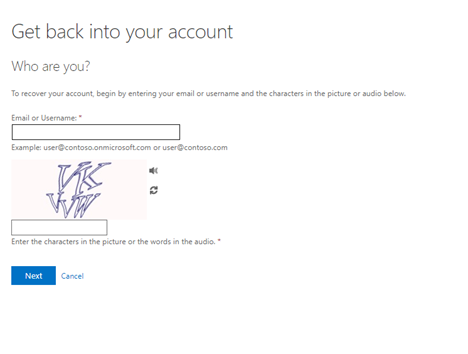
Step 1: Enter your CMCCD email address and complete the CAPTCHA verification.
-
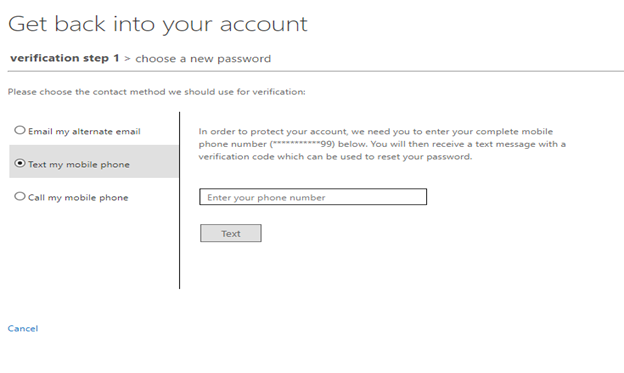
Step 2: Choose your email verification method to receive a security code.
-
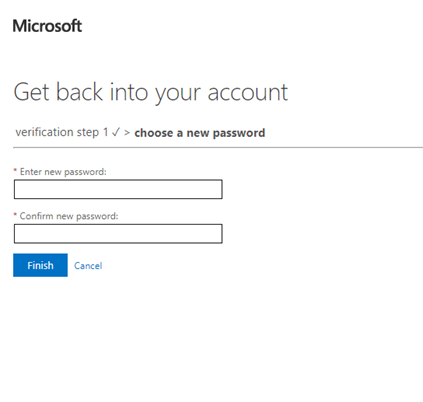
Step 3: Enter the verification code and create a new password.
-
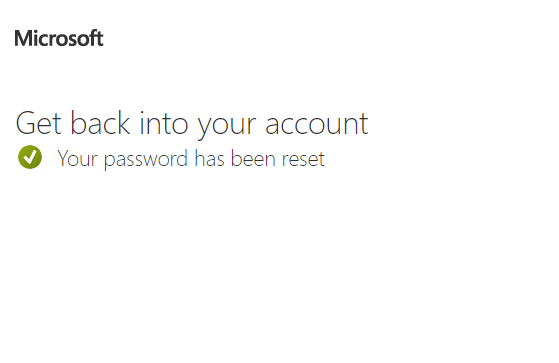
Step 4: Your password has been reset successfully. Return to the CMC login page and sign in with your new password.
4) Still Need Help?
If you continue to have issues resetting your password or accessing your account, please submit a request through the IT Service Desk Portal.
Hours: Monday–Friday, 8:00 AM–3:30 PM. Requests are typically reviewed within approximately 2 hours during business hours. Requests submitted after 3:30 PM will be processed on the next business day. Hours may vary during holidays and summer.